
Documentation
English · 简体中文
Pick the page that matches what you are doing right now:
| What you want | Read this |
|---|---|
| Install it and get a first page working | Getting started |
| Try a configuration without installing anything | Playground |
| Wire it into Vite / Nuxt / Webpack / Taro | Build tool integration |
| Call the compiler from TypeScript or a service | Programmatic API |
| Check the output after changing configuration | CLI preview |
| The project uses Vant / Element Plus / antd… | Component libraries |
| Look up an option name or its default | Configuration reference |
| Understand where the numbers come from | Architecture and formulas |
| Keyboards / address bars / WebViews break the layout | Optional runtime |
| Support an old Safari or WebView | Browser support and degradation |
| Move over from an existing px conversion setup | Migration guide |
| Releases, artifacts, Node versions | Release and compatibility |
| Point a coding agent at this project | Documentation for agents |
Specification and examples:
- Conformance suite — a language-agnostic behavioural definition, pure data, usable as an acceptance suite by an implementation in any language
- Runnable example — a complete app 375 + desktop 1440 project
The core model
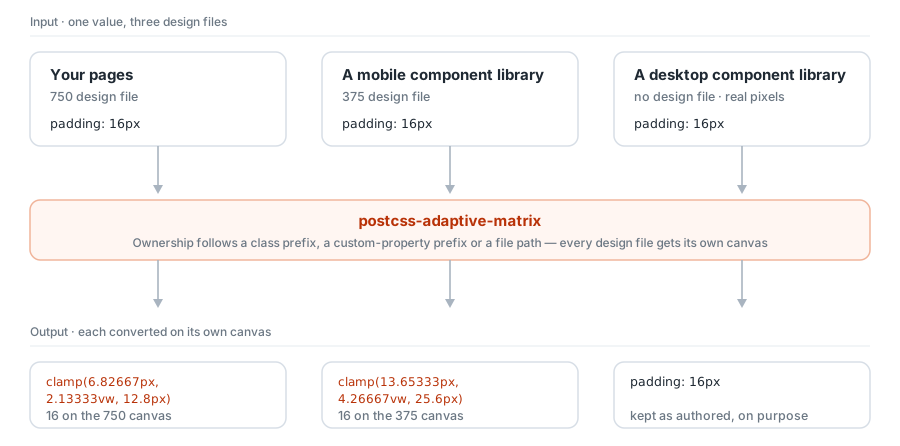
This project solves exactly one problem: a px cannot be converted until you know which design file it was drawn on.
Your pages, a mobile component library and a desktop component library come from three different design files — and the third one may have no design file at all. Giving each file its own canvas (a profile), and converting every px against the width of the canvas it belongs to, is the only approach that does not force a choice between "the page scales but the components stay put" and "the components get stretched against the wrong ratio".
Canvas membership is decided by three channels: class-name prefix, custom-property prefix, and file path. The channels for the built-in component libraries are already written, which is why the default configuration is already correct.